
Alt text for diagrams
Many ways to make meaning.
A flowchart needs more than a one-line alt. Pick your diagram type and get a short alt text and a long description to fill in, with a worked example. Free, no sign-up.
What kind of diagram is it?
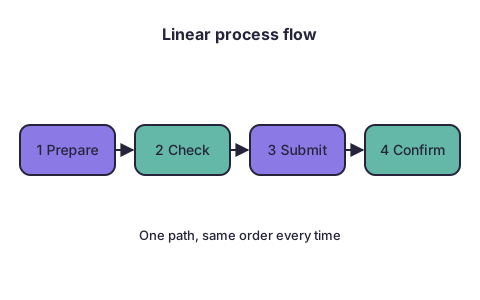
Linear process
Pick another diagramShort alt text
Template
[Process name]: [number] steps, from [first step] to [last step]. Full steps below.
Example
Submitting a request: 4 steps, from Prepare to Confirm. Full steps below.
Long description
Template
[Process name] has [number] steps, done in this order: 1. [Step]. 2. [Step]. 3. [Step]. … It ends when [end result].
Example
Submitting a request has 4 steps, done in this order: 1. Prepare. 2. Check. 3. Submit. 4. Confirm. It ends when the request is confirmed.
Check before you publish
- The long description lists every box, in the order the arrows go.
- Use a numbered list in the long description, not one long sentence.
- If a step says "if", it is a decision flowchart: use that template.
Need the diagram itself? Email your topic to request a custom SVG diagram.
Stuck on your alt text? Email it to the same address.
Decision flowchart
Pick another diagramShort alt text
Template
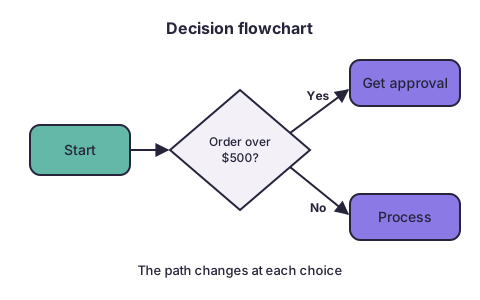
Flowchart: how to decide [what]. It branches at [number] questions. Full paths below.
Example
Flowchart: how an order is handled. It branches at one question. Full paths below.
Long description
Template
Start: [first step]. Question: [question]? If yes, [step], then [end]. If no, [step], then [end]. (Repeat for each question.)
Example
Start: an order comes in. Question: does the order need approval? If yes, get approval, then process it. If no, process it.
Check before you publish
- Every branch is followed to an end; none stops in the middle.
- Each question is written as a question, with its yes and no paths.
- For more than three questions, use a nested list, one level per question.
Need the diagram itself? Email your topic to request a custom SVG diagram.
Stuck on your alt text? Email it to the same address.
Swimlane diagram
Pick another diagramShort alt text
Template
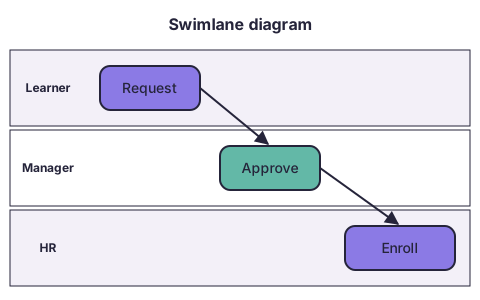
Swimlane diagram: how [process] moves between [role], [role] and [role]. Full steps below.
Example
Swimlane diagram: how a training request moves between learner, manager and HR. Full steps below.
Long description
Template
[Number] roles take part: [roles]. 1. [Role] [does step]. 2. [Role] [does step]. 3. … Hand-offs: [role] to [role] after [step].
Example
Three roles take part: learner, manager and HR. 1. The learner requests training. 2. The manager approves it. 3. HR enrolls the learner.
Check before you publish
- Each step names who does it; that is what the lanes show.
- Steps are in time order, not lane by lane.
- Say each hand-off between roles out loud in the text.
Need the diagram itself? Email your topic to request a custom SVG diagram.
Stuck on your alt text? Email it to the same address.
Cycle diagram
Pick another diagramShort alt text
Template
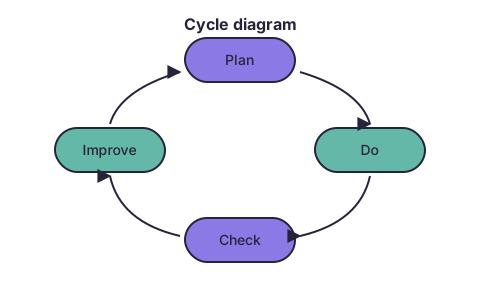
Cycle: [number] stages of [what], repeating: [stage], [stage], [stage]. Details below.
Example
Cycle: 4 stages of improvement, repeating: Plan, Do, Check, Improve.
Long description
Template
[What] is a repeating cycle of [number] stages. 1. [Stage]: [what happens]. 2. … After [last stage], it starts again at [first stage].
Example
Improvement is a repeating cycle of 4 stages. 1. Plan. 2. Do. 3. Check. 4. Improve. After Improve, it starts again at Plan.
Check before you publish
- Say where the cycle starts, even though it is a circle.
- Say plainly that it repeats; the arrows show this, the text must too.
- If the cycle is short (4 stages or fewer), the short alt can hold it all.
Need the diagram itself? Email your topic to request a custom SVG diagram.
Stuck on your alt text? Email it to the same address.
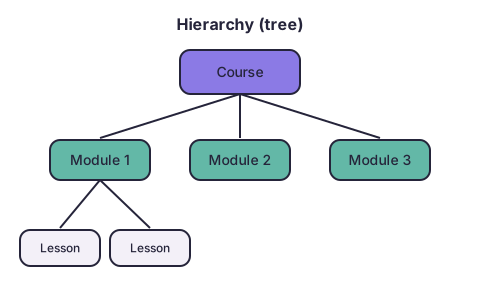
Hierarchy (tree)
Pick another diagramShort alt text
Template
Hierarchy: [top item] contains [number] [items], each with [what]. Full structure below.
Example
Hierarchy: a course contains 3 modules, each with lessons. Full structure below.
Long description
Template
a nested list, one level per level of the tree. "[Top item]: - [Item], containing [items] - [Item] …"
Example
Course: - Module 1, containing a lesson - Module 2, containing a lesson - Module 3.
Check before you publish
- Use a nested list; screen readers announce list levels.
- Say how many items sit at each level.
- An org chart names roles, and names people only if the page needs them.
Need the diagram itself? Email your topic to request a custom SVG diagram.
Stuck on your alt text? Email it to the same address.
Labeled diagram
Pick another diagramShort alt text
Template
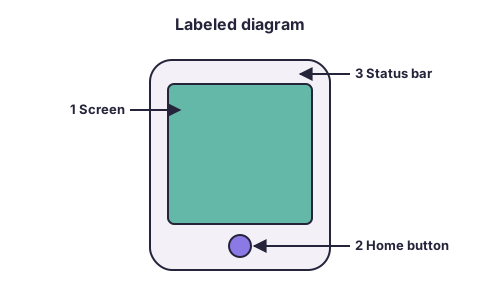
[Object] with [number] labeled parts: [part], [part] and [part]. Details below.
Example
Phone screen with 3 labeled parts: the screen, the home button and the status bar.
Long description
Template
1. [Part]: [where it is] and [what it does]. 2. …
Example
1. Screen: the main area, where the app shows. 2. Home button: at the bottom, returns to the home screen. 3. Status bar: across the top, shows time and battery.
Check before you publish
- Match the numbers in the text to the numbers on the picture.
- Say where each part is, in plain words (top, left, under the screen).
- Say what each part is for, not only its name.
Need the diagram itself? Email your topic to request a custom SVG diagram.
Stuck on your alt text? Email it to the same address.
System loop
Pick another diagramShort alt text
Template
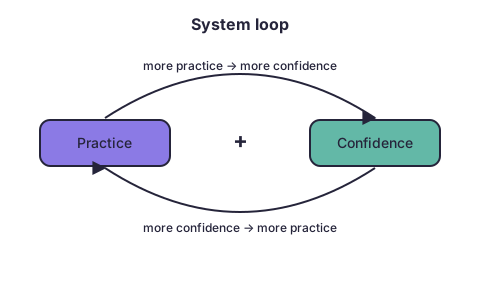
Loop: [cause] and [effect] reinforce each other. Explained below.
Example
Loop: practice and confidence reinforce each other.
Long description
Template
More [A] leads to more [B]. More [B] leads to more [A]. So [what happens over time].
Example
More practice leads to more confidence. More confidence leads to more practice. So each one keeps building the other.
Check before you publish
- Write each arrow as a sentence: "more X leads to more (or less) Y".
- Say what happens over time: growth, decline or balance.
- If there are more than two causes, list each link on its own line.
Need the diagram itself? Email your topic to request a custom SVG diagram.
Stuck on your alt text? Email it to the same address.
Timeline
Pick another diagramShort alt text
Template
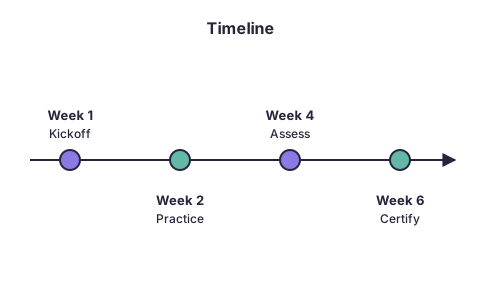
Timeline of [what], from [first date] to [last date], with [number] milestones. Details below.
Example
Timeline of a 6-week program, from Week 1 to Week 6, with 4 milestones.
Long description
Template
[Date]: [event]. [Date]: [event]. …
Example
Week 1: kickoff. Week 2: practice. Week 4: assessment. Week 6: certification.
Check before you publish
- Dates come first in each line, so a listener can skim.
- Keep the order of the picture: earliest first.
- Say if the gaps between dates matter (a long gap, a deadline).
Need the diagram itself? Email your topic to request a custom SVG diagram.
Stuck on your alt text? Email it to the same address.
Concept map
Pick another diagramShort alt text
Template
Concept map of [topic]: [number] ideas linked to [central idea]. Links below.
Example
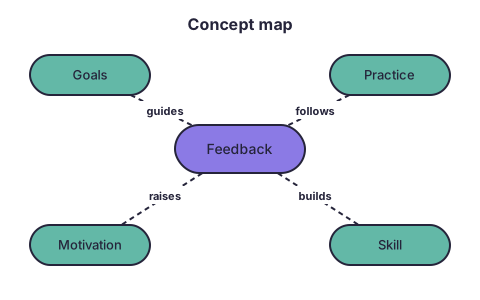
Concept map: 4 ideas linked to feedback. Links below.
Long description
Template
one sentence per line on the map, "[Idea] [link word] [idea]."
Example
Feedback guides goals. Feedback follows practice. Feedback raises motivation. Feedback builds skill.
Check before you publish
- Write each line as a sentence using its link word.
- Start with the central idea, then go outward.
- If the map is large, group sentences under its main branches.
Need the diagram itself? Email your topic to request a custom SVG diagram.
Stuck on your alt text? Email it to the same address.
Where to put it
In Rise and Storyline, type the short alt text in the image's alt text field, without quotes. Put the long description in text on the page, right after the diagram, or on a linked page, and say in the alt where it is. W3C suggests showing the long description to everyone, not only to screen readers.
Sources: W3C WAI Complex Images tutorial (https://www.w3.org/WAI/tutorials/images/complex/, updated 8 Apr 2026, read 2026-11-17); W3C Images tips (https://www.w3.org/WAI/tutorials/images/tips/, read 2026-11-17); Articulate community search results on alt-text fields in Rise/Storyline (read as search summaries only).
How it works
Screen-reader users can't see the arrows in a flowchart, so they need the same information in words. A short alt text names the diagram and says where the full description is; the long description walks through it in the order a sighted learner would follow.
These templates follow W3C's guidance for complex images. Fill in the brackets, read it aloud and ask: could someone follow the process from this text alone? This page is a starting point, not an accessibility audit.